
The task itself
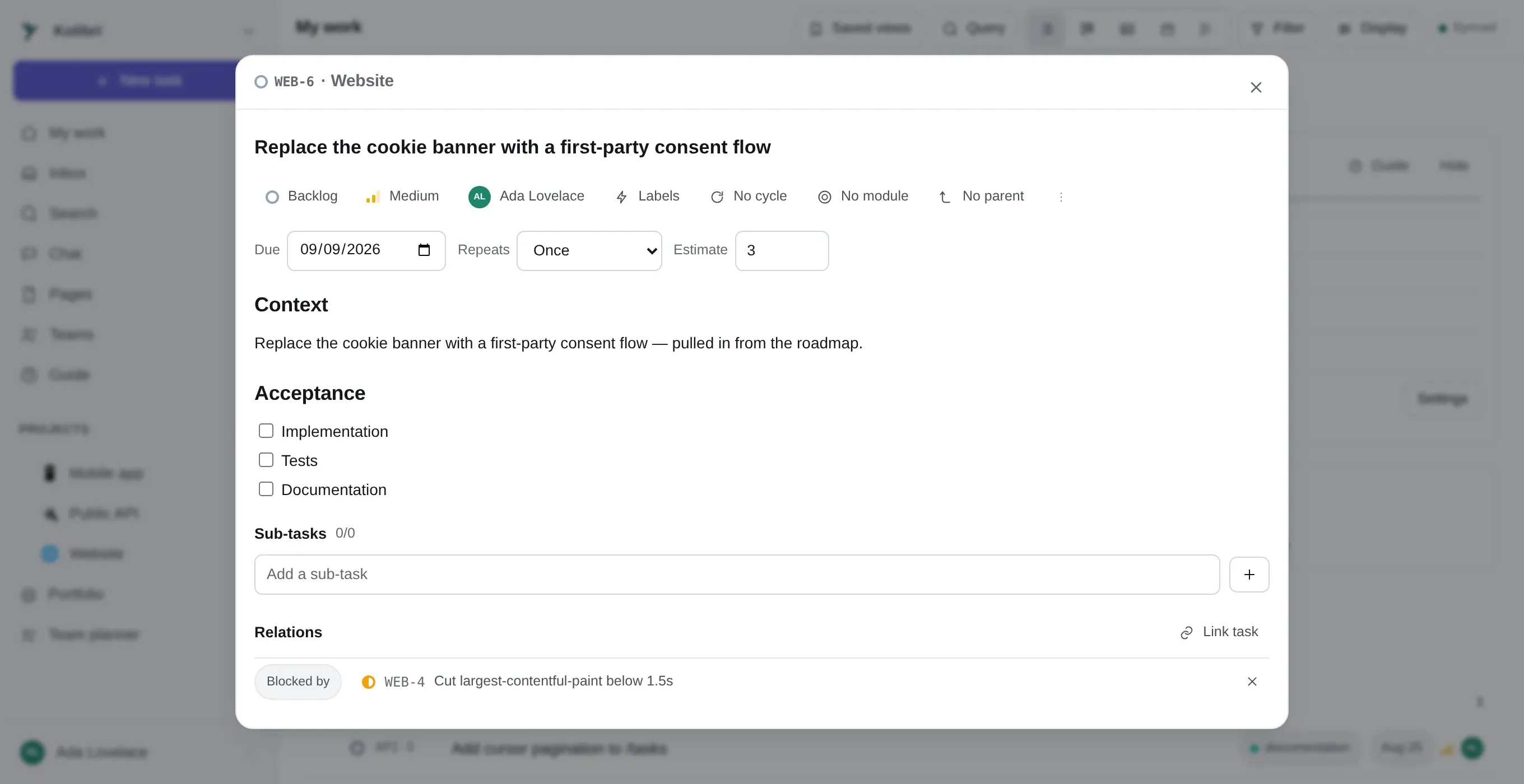
Clicking a task anywhere opens it as a sheet over whatever you were looking at, so you do not
lose the board you were reading. Esc closes it. Its own URL is
/t/WEB-42, which is what a link pasted into chat resolves to.
The fields
Section titled “The fields”| Title | One line. It is what shows in every list, so it is worth making it name an outcome rather than an area |
| Description | Markdown, with @mentions, images you can drag in, and links to other tasks by identifier |
| State | One of the project’s workflow states. Which group it belongs to — backlog, todo, in progress, done, cancelled — is what the rest of the app reasons about |
| Priority | Urgent, high, medium, low, or none |
| Assignees | Several people can be on one task |
| Labels | The project’s own vocabulary. A task can wear any number |
| Estimate | A number of points — see below |
| Due date | A day, not a time. This is what the calendar feed and the due-soon reminder read |
| Start date | Used by the timeline; ignored everywhere else |
| Cycle | Which sprint it is in |
| Module | Which milestone it belongs to |
| Parent | Makes this a sub-task of another |
| Custom fields | Whatever the project asks of every task — see custom fields |
Below those: sub-tasks, relations, attachments, time, comments and the activity trail.
Estimates are points, on purpose
Section titled “Estimates are points, on purpose”Estimate is a guess at size, not at hours, and Kolibri deliberately never compares it with
logged time. There is no “3h of 5” anywhere, because that would be adding up two different
things and printing the result confidently.
If your team estimates in hours, nothing stops you putting hours in the field — but the cycle burn-up will then be burning hours, and time tracking will still be a separate number beside it. See time tracking.
Relations
Section titled “Relations”Four kinds, to any other task in any project:
| blocks | This has to be finished before that one can be |
| is blocked by | The mirror of it |
| relates to | Neither of you is waiting; they are just about each other |
| duplicates | Say this on the newer one |
A relation is written once, in one direction and shown from both. Adding “A blocks B” makes “B is blocked by A” appear on B; you do not — and cannot — add both.
Blocking is the one relation that does something beyond linking: the timeline reads it, so dragging a task later moves everything it blocks, and a board can be set to mark blocked cards.
Following a task
Section titled “Following a task”The Follow button puts you on the list of people notified about comments on it. You are followed automatically when you are assigned, when you comment, and when you created it — so this button is mostly for the case where you want to watch something you have nothing to do with, and for the case where you want to stop.
The activity trail
Section titled “The activity trail”Every change to the task, in order, with who made it. This is not a comment thread and cannot be written to — it is a record. A change that arrived from somebody’s phone three hours after they made it is stamped with when it was made, not when it landed.
Archiving, deleting and the trash
Section titled “Archiving, deleting and the trash”Three different things, and the difference matters:
Archiving takes a task off the board and out of the default filters, keeping everything. Use it for work that is genuinely finished with, in a project that is still running.
Deleting writes a tombstone. The task disappears from every view on every device — and it is still there. Settings → Data lists what has been deleted and puts it back.
Emptying the trash is the point at which something is actually gone. An admin does that, or a retention window does it on a schedule, and every device then honours it. This is the only irreversible one of the three.
Moving a task to another project
Section titled “Moving a task to another project”Change its project. The identifier changes — WEB-42 becomes API-17 — because the identifier
says which project it is in, and a task in API numbered WEB-42 would be a lie that outlives
everybody who understood it. Links to the old identifier stop resolving; the task’s internal id
does not change, so a link made through the interface still lands.
If the identifier being stable matters more to you than it being honest, close the task and open a new one, and say so in the description.